Cracking Microsoft Certified Professional Exam 70-483 in 37 Days!
Thinking of cracking this exam? Great decision! Yes! Cracking this exam can do wonders for you.
 |
| MCP 70-483 Certification Badge |
It helped me to get my resume shortlisted and eventually getting an offer from Microsoft !! Crazy right ? Certifications do help when it comes to resume shortlisting but you should know your stuff, there's no shortcut there. After all, that's what interviews are meant for - to check if you are only good on paper or you really back what you wrote in your resume 😈
Alright!! After such a grandiloquent paragraph, let's discuss business - Certification Exam and Preparation. If you are just entering the world of Microsoft Certifications, I would recommend you to start here How I Cracked MTA 98-361 in 17 Days!
Let's concentrate on MCP 70-483 Exam now:
Why MCP 70-483 ?
Passing MCP 70-483 will help showcase the following:
Who should go for MCP 70-483 ?
When I appeared for the exam, I already had more than 02 years of experience in C# and .NET under my belt. The official website also suggests that candidates having 01 or more years of experience should go for it. That being said, with proper strategy and exhaustive preparation, one can crack this certification even if he/she doesn't have industry experience.
However, keep in mind that this exam is not a cake walk and one has to dedicate time for it. As as a professional, I can assure you that working in a software development firm and cracking certification exams are two different things but they compliment each other.
What to expect in MCP 70-483 Exam ?
That's clearly stated on the official website as shown below:
Just click on the + icon to expand each topic and view the details.
Please pay attention to the highlighted part in the image. It suggests that there are some changes/ addition to the syllabus for the Exam 70-483. You must download the Exam 70-483 change document and make sure that you have covered all the topics including the newly added ones! Let's jump to the juicy part now - Preparation !
How did I prepare ?
Please note that we have to adhere to the NDA (Non-Disclosure Agreement) from Microsoft. Hence you'll not find exact questions and answers (or Brain-Dumps) here. However, if you sincerely follow the stated guidelines, you'll hit the bull's eye for sure.
The Bible for preparing for Exam 70-483 is the Book by Wouter de Kort published by Microsoft Press. I highly recommend that you study each and every topic from this book. This book really covers all the topics really well and you will be at a different level after completing this book. You can buy the book here - Buy Exam 70-483 Ref on Amazon
Please Note: I have given an exhaustive list of references at the end to help you prepare for the exam.
Manage Program Flow (Day 1 - Day 8):
This section mainly consisted of - Multi-threading, Events and Delegates, Exception handling. I must confess here that if you have industry experience building software then this section will not be a big deal for you as you must have encountered these in your daily work. If you are a newbie learning on your own, it may take some time to get your head around this. Practice is the Mantra!
Create and Use Types (Day 9 - Day 16):
This part concentrated on Value Types, Reference Types, Dynamic Types, Strings in C#. Pay close attention to these Interfaces is C# - IComparable, IEnumerable, IDisposable and IUnknown. Also, Reflection is one of the important topics in C#. Give enough time to it as it's useful for exams and is a life saver when you make real world software.
Debug Applications and Implement Security (Day 17 - Day 24):
This section wants you to know about - Symmetric and Asymmetric Encryption, Security Certificates, Key Management, .NET Assemblies, Logging, Application Profiling.
I have personally experienced that people having 2-3 years of experience lack in this part of the exam e.g. Implementing Security, Application Profiling, Debugging Memory Leaks, etc... You'll usually see a developer having around 7-10 years of experience handling this stuff in the company. Less experienced Developers are mainly busy expanding the feature set of the Application. You feel me ? Now you see why you should crack this exam 😉
Pro Tip: All you less experienced Developers/ newbies out there, invest enough time here!
Passing MCP 70-483 will help showcase the following:
- You are well versed with C# and developing .NET Applications using C#.
- You are a self learner and continuously update your skills and knowledge.
- You are serious about your career and care to calibrate your skills and expertise.
Who should go for MCP 70-483 ?
When I appeared for the exam, I already had more than 02 years of experience in C# and .NET under my belt. The official website also suggests that candidates having 01 or more years of experience should go for it. That being said, with proper strategy and exhaustive preparation, one can crack this certification even if he/she doesn't have industry experience.
 |
| Image Source: Microsoft |
What to expect in MCP 70-483 Exam ?
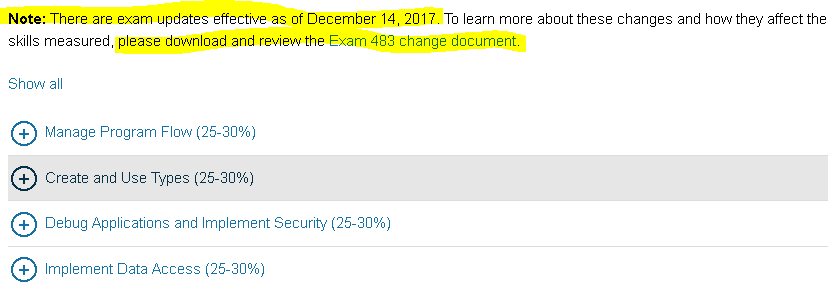
That's clearly stated on the official website as shown below:
 |
| Image Source: Microsoft |
Please pay attention to the highlighted part in the image. It suggests that there are some changes/ addition to the syllabus for the Exam 70-483. You must download the Exam 70-483 change document and make sure that you have covered all the topics including the newly added ones! Let's jump to the juicy part now - Preparation !
How did I prepare ?
Please note that we have to adhere to the NDA (Non-Disclosure Agreement) from Microsoft. Hence you'll not find exact questions and answers (or Brain-Dumps) here. However, if you sincerely follow the stated guidelines, you'll hit the bull's eye for sure.
The Bible for preparing for Exam 70-483 is the Book by Wouter de Kort published by Microsoft Press. I highly recommend that you study each and every topic from this book. This book really covers all the topics really well and you will be at a different level after completing this book. You can buy the book here - Buy Exam 70-483 Ref on Amazon
Please Note: I have given an exhaustive list of references at the end to help you prepare for the exam.
Manage Program Flow (Day 1 - Day 8):
This section mainly consisted of - Multi-threading, Events and Delegates, Exception handling. I must confess here that if you have industry experience building software then this section will not be a big deal for you as you must have encountered these in your daily work. If you are a newbie learning on your own, it may take some time to get your head around this. Practice is the Mantra!
Create and Use Types (Day 9 - Day 16):
This part concentrated on Value Types, Reference Types, Dynamic Types, Strings in C#. Pay close attention to these Interfaces is C# - IComparable, IEnumerable, IDisposable and IUnknown. Also, Reflection is one of the important topics in C#. Give enough time to it as it's useful for exams and is a life saver when you make real world software.
Debug Applications and Implement Security (Day 17 - Day 24):
This section wants you to know about - Symmetric and Asymmetric Encryption, Security Certificates, Key Management, .NET Assemblies, Logging, Application Profiling.
I have personally experienced that people having 2-3 years of experience lack in this part of the exam e.g. Implementing Security, Application Profiling, Debugging Memory Leaks, etc... You'll usually see a developer having around 7-10 years of experience handling this stuff in the company. Less experienced Developers are mainly busy expanding the feature set of the Application. You feel me ? Now you see why you should crack this exam 😉
Pro Tip: All you less experienced Developers/ newbies out there, invest enough time here!
Implement Data Access (Day 25 - Day 32):
This section wants you to know all the possible cases in which you will handle your data e.g. Streams, Json/ Xml Data, Json/Xml Serializer/ Deserializer, LINQ (Very Important! ), and Collections - Lists, Dictionaries, Arrays, etc...
Miscellaneous (Day 33 - Day 37):
Relaxed my nerves. I tried to browse through every possible relevant link on the Web for 70-483 just to check if I missed anything. This is important because when you see a topic at random and know the concepts and can answer questions on that, it really boosts confidence.
Lastly, don't panic! It's just an exam but make sure you do your due diligence. All the best! Let me know your certification experience in the comments section.
Resources/ References
Here is the list of resources/ references that can be used in preparing for MCP 70-483:
What next after MCP 70-483 ?
So far so good! What next ? Well, you can use this Certification Planner from Microsoft to decide your paths and next certifications. I just want to add my 2 cents here - Also go for Azure Certifications as Cloud is and will be in the boom. I am myself progressing towards becoming a Cloud Architect. I will be posting articles on the same very soon. Stay tuned and thanks for stopping by!
I really hope that has been informative. Please share your certification experiences so that others can benefit too :)
This section wants you to know all the possible cases in which you will handle your data e.g. Streams, Json/ Xml Data, Json/Xml Serializer/ Deserializer, LINQ (Very Important! ), and Collections - Lists, Dictionaries, Arrays, etc...
Again, if you have some industry experience then this section will be a cakewalk as handling the data is the most trivial task a developer does every single day! Even if you are studying on your own, this part is very interesting and it's easy to get the hang of it.
Miscellaneous (Day 33 - Day 37):
Relaxed my nerves. I tried to browse through every possible relevant link on the Web for 70-483 just to check if I missed anything. This is important because when you see a topic at random and know the concepts and can answer questions on that, it really boosts confidence.
Lastly, don't panic! It's just an exam but make sure you do your due diligence. All the best! Let me know your certification experience in the comments section.
Resources/ References
Here is the list of resources/ references that can be used in preparing for MCP 70-483:
- A decent YouTube playlist covering most of the topics
- shanebrewer.com - Passed MCSD Exam 70-483 Programming in C#
- How to prepare for Microsoft exam 70-483
- Pluralsight.com - C# Path
- Six tips for passing a microsoft certification exam
- Microsoft 70-483 Exam preparation guide
What next after MCP 70-483 ?
So far so good! What next ? Well, you can use this Certification Planner from Microsoft to decide your paths and next certifications. I just want to add my 2 cents here - Also go for Azure Certifications as Cloud is and will be in the boom. I am myself progressing towards becoming a Cloud Architect. I will be posting articles on the same very soon. Stay tuned and thanks for stopping by!
I really hope that has been informative. Please share your certification experiences so that others can benefit too :)
Happy Coding!